
Let me guess you saw a 300 Mbps internet plan and thought, “Okay, cool… but what does that actually mean when I download something?”
Table of Contents
Totally normal. Internet companies like using Mbps, but your browser, Steam, Netflix downloads, file transfers, and most apps show speeds in MB/s. That tiny difference in units creates a lot of confusion.
So today we’ll break down 300 Mbps to MB/s, explain it step-by-step like a friend would, and clear up the “is 300 Mbps fast?” debate once and for all. We’ll also show how Mbps to Gbps fits into everything so you aren’t stuck decoding tech speak like it’s a secret spy language.
Grab a coffee let’s turn internet math into something your grandma could understand.
First Principles: Bits vs Bytes (aka why this confuses everyone)
Let’s start super simple.
| Term | Meaning | Used For |
|---|---|---|
| bit (b) | Smallest unit of data | ISP internet plans |
| byte (B) | 8 bits | File sizes, download speeds shown by devices |
One golden rule lives at the core of everything:
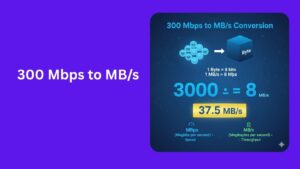
1 byte = 8 bits
This is why converting 300 Mbps to MB/s requires dividing by 8.
ISPs show Megabits (Mb), but your device usually shows Megabytes (MB). Same idea, different unit. Kind of like inches and feet related but not equal.
The Simple Formula (You’ll Use This Forever)
Write this down or save it:
MB/s = Mbps ÷ 8
So, to convert 300 Mbps → MB/s:
300 ÷ 8 = 37.5
300 Mbps = 37.5 MB/s
That’s it. No magic. Just basic math and remembering 8 bits = 1 byte.
Full Step-by-Step Breakdown (No Skipping Steps)
Let’s do the math long-hand because transparency matters.
We want:
300 Mbps / 8
- 8 goes into 30 → 3 times (3 × 8 = 24)
Remainder = 30 − 24 = 6
Bring down next 0 → becomes 60 - 8 goes into 60 → 7 times (7 × 8 = 56)
Remainder = 60 − 56 = 4
Bring down a decimal 0 → becomes 40 - 8 goes into 40 → 5 times (5 × 8 = 40)
Remainder = 0
So we got 37.5
Math complete.
Final answer: 300 Mbps = 37.5 MB/s (megabytes per second)
If you ever forget, remember: divide Mbps by 8.
So… Is 300 Mbps Fast?
Short answer:
Yes. 300 Mbps is fast for most people.
Long answer: it depends on how many people and devices are using it.
Real-world examples
- Single person: smooth like butter
- Small family: plenty for movies, gaming, Zoom
- Shared apartment with 6 heavy users? Still solid
- Startup office? Might want 500 Mbps or 1 Gbps later
Streaming wise:
| Activity | Speed Needed |
|---|---|
| 4K Netflix | ~25 Mbps per stream |
| Online gaming | ~5–10 Mbps |
| Zoom HD call | 3–6 Mbps |
| Social media browsing | 1–5 Mbps |
With 300 Mbps you could technically run:
- 12 streams of 4K video at once
- Game + stream + Zoom + downloads without sweating
So yes is 300 Mbps fast?
Absolutely. Unless you’re running a crypto mining farm and live streaming your cat 24/7, you’re good.
But Why Do My Downloads Show 35–38 MB/s Instead of 300?
This is where people panic:
“My plan says 300 Mbps but I’m only seeing 37 MB/s! Scam!”
Nope. You’re actually getting full speed. You’re just reading different units.
- ISP gives 300 Megabits
- Your computer shows Megabytes
- 300 ÷ 8 = 37.5 MB/s
So if you see 35–38 MB/s, you’re golden.
Anything in ~37 MB/s range = your line is healthy.
Read more: How Many Ounces in a Pound?
What About mbps to gbps? (Quick refresher)
Sometimes you’ll see Gbps internet (gigabit).
Conversion:
1 Gbps = 1000 Mbps
So to convert:
300 Mbps ÷ 1000 = 0.3 Gbps300 Mbps = 0.3 Gbps
Easy.
How Fast Does 300 Mbps Download Files? (Real Examples)
Time to see what 37.5 MB/s actually feels like.
We’ll use both decimal and binary file sizes because different apps measure differently.
1 GB file
Decimal: 1000 MB
Binary: 1024 MB
Math using 37.5 MB/s:
1000 ÷ 37.5 ≈ 26.67 seconds
1024 ÷ 37.5 ≈ 27.31 seconds
So about 27 seconds per GB.
10 GB file (big software install)
10000 ÷ 37.5 ≈ 266.67 sec ≈ 4 min 27 sec
10240 ÷ 37.5 ≈ 273.07 sec ≈ 4 min 33 sec
4–5 minutes. Nice.
50 GB game download
Gamers, this one’s for you.
50000 ÷ 37.5 ≈ 1333 sec ≈ 22 min 13 sec
51200 ÷ 37.5 ≈ 1365 sec ≈ 22 min 45 sec
So a 50 GB Steam game ≈ 22–23 minutes.
That’s pretty sweet for large titles.
Why Your Speed Might Look Slower (Real-World Causes)
Even if your math says 37.5 MB/s, your speeds might wobble. Happens to everyone.
Possible reasons:
| Reason | Explanation |
|---|---|
| Wi-Fi interference | Walls & devices mess with signal |
| Router limits | Old routers struggle |
| Server throttle | The download source can be slow |
| Peak hours | Neighbors using high bandwidth |
| VPN active | Encryption slows things a bit |
| Old laptop/phone | Hardware bottleneck |
| Background apps | Cloud sync, Windows update, etc |
Quick advice:
Test speeds on wired ethernet first. Wi-Fi lies sometimes.
Simple Fixes to Improve Speed
Try these:
- Switch to 5GHz or Wi-Fi 6 router band
- Move router to open space
- Use ethernet for big downloads
- Disable VPN temporarily
- Close background apps syncing files
- Update router firmware
- Restart modem/router monthly
Just doing those often jumps you from “meh speed” to “oh wow this is fast.”
Download Time Formula (Use Anytime)
Keep this:
Download time (seconds) = File size (MB) ÷ MB/s

Then:
Minutes = seconds ÷ 60
Easy to plug numbers for any speed.Quick Reference Cheat Sheet
| Value | Equivalent |
|---|---|
| 300 Mbps to MB/s | 37.5 MB/s |
| 300 Mbps to Gbps | 0.3 Gbps |
| 1 byte | 8 bits |
| 1 GB download time on 300 Mbps | ~27 seconds |
Bookmark this or screenshot it.
Read more: Skymint | Michigan’s Cannabis Retailer
Plain English Summary (No Tech Mumbo-Jumbo)
- 300 Mbps internet = fast
- Actual download speed you see = ~37.5 MB/s
- Divide by 8 to convert Mbps → MB/s
- 1 GB file takes ~27 seconds
- 50 GB game takes ~22 minutes
- Wi-Fi, routers, and servers affect actual speeds
If someone asks you “Is 300 Mbps fast?”
Tell them:
“Yeah, it’s enough for multiple 4K streams and gaming at the same time.”
And if someone struggles with mbps to gbps:
“Move the decimal three places. 300 Mbps = 0.3 Gbps.”
Boom. You’re now the internet-speed guru of your friend circle.
Final Thoughts
You came here wondering about 300 Mbps to MB/s, and now you know:
300 Mbps = 37.5 MB/s
Plus you learned:
- Why speeds look different on devices
- Whether 300 Mbps is fast (spoiler: it is)
- Real download time examples
- How to convert mbps to gbps
- What affects real-world speeds
- How to troubleshoot slow Wi-Fi